Kwai Ad Setup Guide:
First 3 Days Campaign Optimization
Setting up your ad placements correctly is the foundation of a successful
campaign. The Ad Placement Setup Guide will walk you through how to strategically position
your ads to maximize visibility, reach your target audience effectively, and achieve optimal
performance. We will provide a detailed breakdown of how to set up your campaign for the
first three days after receiving it.
1. The first day of the campaign
Focus:
The primary goal on the first day is to set up ad groups and creatives while
driving paid data performance to establish a strong foundation for optimization.
Ad Construction:
Standard Setup – “1-5-5” Structure
- Campaigns, ad groups, and creatives follow the “1-5-5” model.
- While there’s no strict quantity requirement, this structure supports efficient campaign
management and stable performance.
- Build at least 5 ad groups per campaign.
- Ideally, update 3–5 ad groups daily to maintain momentum.
- Each ad group should include a minimum of 5 creatives (up to 15) to
accelerate early
testing and quickly identify high-performing creatives.
Early-Stage Paid Event Activation – “1-3-5” Structure
If the goal is to activate paid events during the early phase, use the “1-3-5”
model:
- Create no more than 3 ad groups under a single campaign.
- Include around 5 creatives per group to maintain control and
precision during initial
testing.
Campaign Settings:
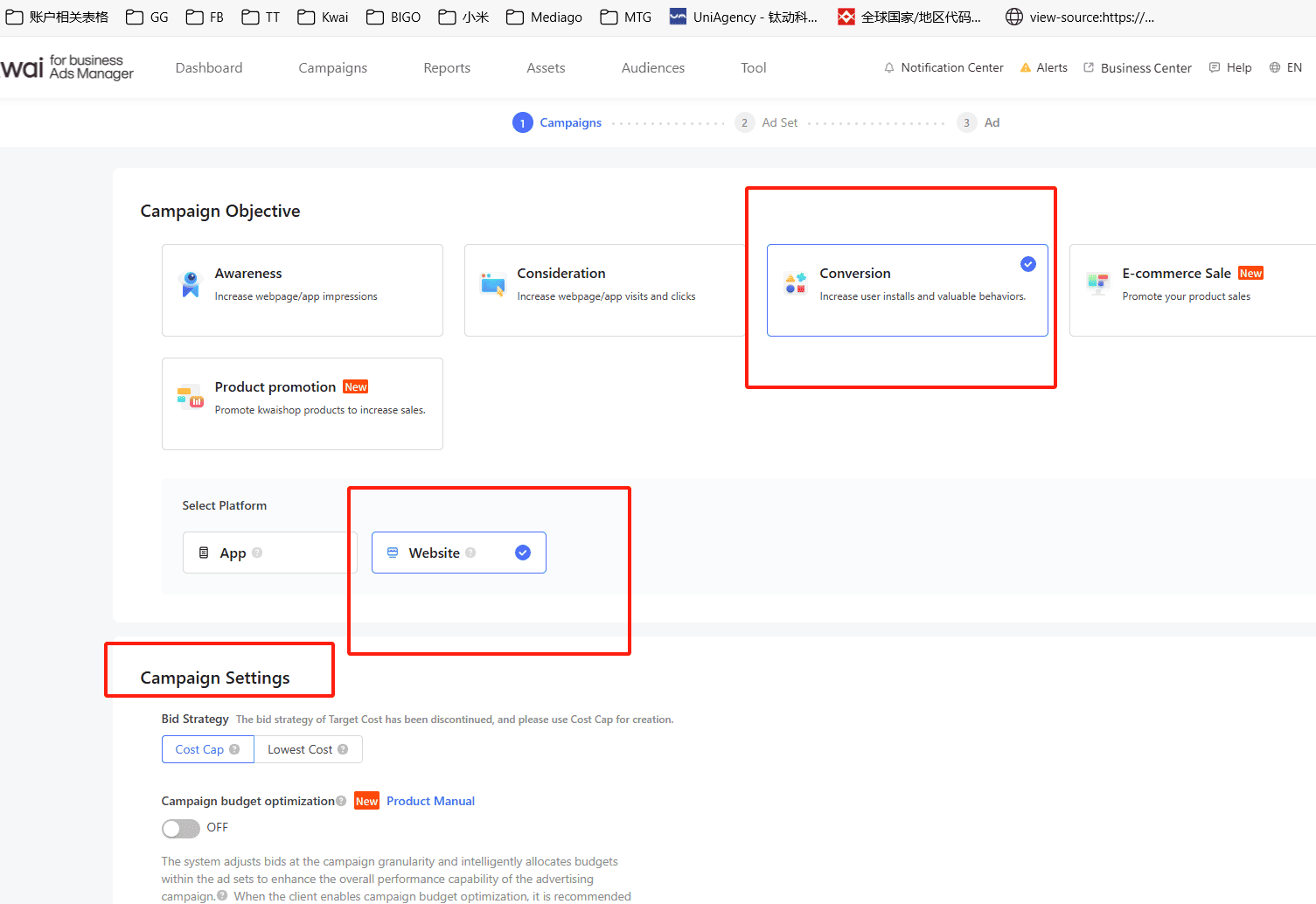
- Objective: Conversion
- Bidding Strategy:
- Primarily use CC (Cost Cap) for target cost control.
- Supplement with LC (Lowest Cost) for minimum conversion cost optimization.
Important:
CC and LC campaigns must be created separately, as the bidding strategy cannot be changed
after campaign creation.
- Budget:
- The CC campaign-level budget can be set to unlimited.
- Platform Selection: Website
Budget Setting Recommendations

- For beginners or those testing with a daily budget under $500, it is
recommended to
enable Campaign Budget Optimization (CBO) initially. This allows the system to
automatically allocate the budget more efficiently.
- For LC campaigns, the initial budget per plan can start from $50–$100
for observation
and testing.
- Of course, CBO is optional — if you choose not to enable it, there is
no budget cap at
the campaign level, and you can allocate a flexible budget at the ad group level
instead.
Ad Sets Settings
Kwai Advertising Delivery Platform Operation Manual

Time Zone Reference for Budget Scheduling in Kwai
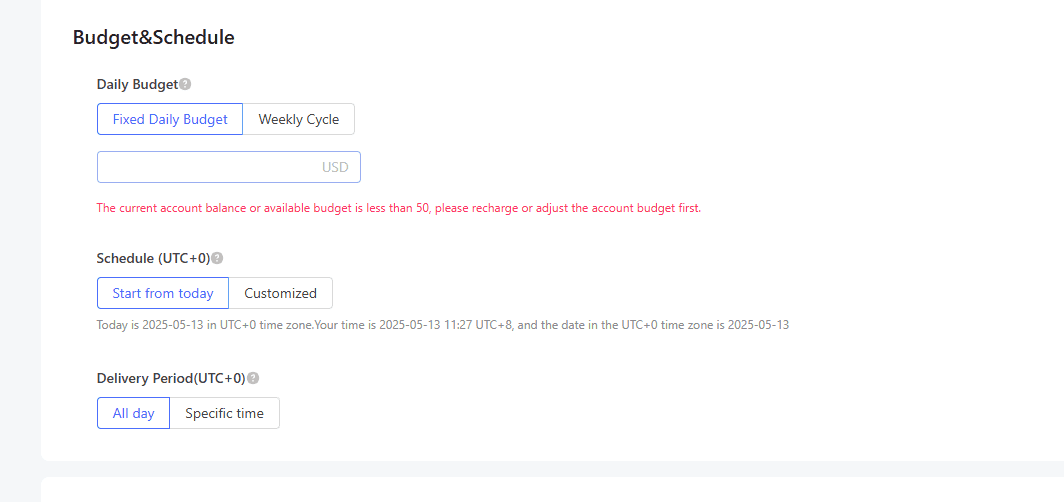
- Please note that Kwai's default time zone is UTC+0 (also known as GMT or "zero time
zone").
- This means that the start time for ad budget scheduling is based on
00:00 UTC. Be sure
to align your budget pacing and campaign launch schedules according to UTC time to avoid
delivery mismatches or timing confusion.
- The daily fixed budget of CC is based on the assessment requirements
in the early stage.
If the paid cost requirement is within 15, it can be set to 100; if the paid cost
requirement is 15-25, it can be set to 200
- Regardless of the cost of the LC assessment, the advertising group
can first give 100
budgets to observe the delivery data and make timely adjustments.
Conversion Goal
1.Initial Setup
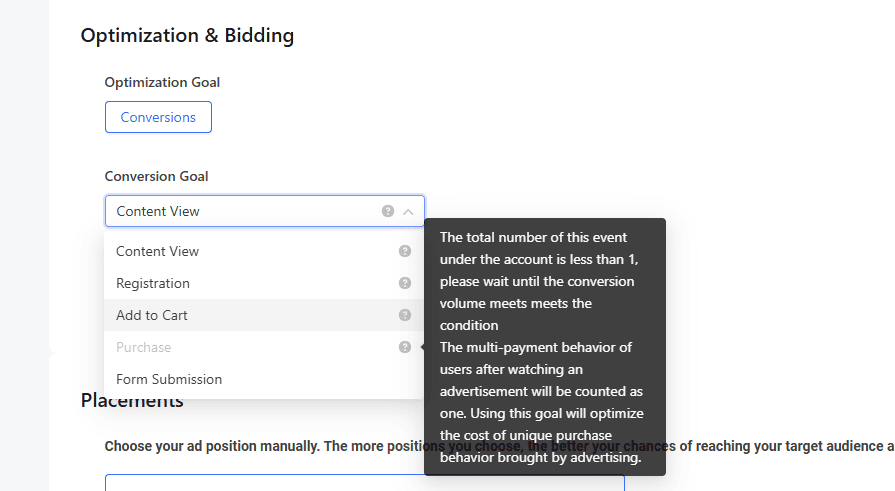
- Start by selecting “Content View” as the conversion goal.
- After achieving 10 successful registrations, switch the goal to “Complete Registration.”
2.Event Delivery Logic
- Generally, events are selected for delivery.
- However, paid events require at least one actual conversion to unlock (they cannot be
activated directly without data).
- Therefore, begin by delivering activation events first to accumulate initial
conversions.
3.Bidding Strategy for Activation Events
- Set the initial bid at 0.3.
- Adjust the bid gradually based on spending pace, increasing or decreasing by 0.05 each
time to avoid large fluctuations.
4.Transition to Paid Events
- Once paid events are ready to run, create a new ad group specifically for them.
- You cannot modify the ad group that previously contained activation events.
- For paid events, set the initial bid at 1.0–1.2× the target cost specified by the client
to ensure stable delivery and sufficient exposure.
Placements: You can tick both In-feed Ads and Rewarded Ads.
Ads
Kwai Advertising Delivery Platform Operation Manual
Activation/View 1-2 hours after content ad set is turned
on:
- Pay attention to the consumption rate of the ad group. If the
consumption per hour
exceeds $10 and there is no paid conversion, it is considered to be too fast and the bid
can be lowered.
- If the consumption per hour is less than 2 US dollars and there is no
paid conversion,
it means that the consumption is too slow and the bid can be increased.
- If there is a payment, immediately pause the ad group that is
currently
activating/viewing content events.
- The ad groups for new paid events should be built according to the
conventional
structure of "1-5-5". Under a single account, it is best to run no more than 5 LC ad
groups at the same time.
- It is best to run no more than 50 CC ad groups at the same time.
2-3 hours after the paid event starts:
- Pay attention to the time-sharing consumption data of the advertising
group. Configure
and view it in Report-Custom Report
- If the LC ad group consumes half of the current budget or $50, and
has not paid, the LC
ad group will be closed, and a new one can be created.
- One more thing to add; If the CC advertising group consumes less than
5 US dollars in a
time-sharing manner, the price will be raised. The range of each price increase can
refer to 10%-20% of the assessment cost.
- The highest CC bid should not exceed 1.5 times the assessment cost;
if the cost reaches
50 US dollars or there is no order after 60,000 exposures, the ad will be closed.
- Group, and create a corresponding number of ad groups or open the
reserved ad groups to
be delivered
2. Day 2 of the Campaign
Goal:
Focus on accumulating paid users and evaluating the performance framework of
creatives within the account.
How to Identify the High-Performing
Creative Framework:
- Analyze the first day’s data by sorting creatives in descending order of spend.
- Select the creatives that have already generated paid traffic for retesting and
validation.
Important:
Before starting the retest, categorize creatives into distinct framework types — for
example:
- Live streaming clips
- Gameplay screen recordings
- Recharge discount tutorials
- High-conversion or viral short clips
This classification helps streamline analysis, improve optimization efficiency, and identify
the most effective creative direction for scaling.
Advertising construction and budget
allocation for new and old materials:
Day 1 Budget Allocation:
- Allocate 80% of the budget to testing creatives that have already received paid traffic,
and limit new creatives to no more than 20% of the budget.
Day 2 Material Mix:
- Use a 50/50 split between old material frameworks tested on Day 1 and new material
frameworks not yet tested.
Advertising Volume Adjustment:
- If peak spend on Day 1 or within the last 6 hours is below $10, create a new ad group
with 3 LC campaigns to expand volume.
Budget Strategy for CC vs LC:
- If CC campaigns consume 60% of the daily budget on Day 1, continue building CC ad groups
and temporarily pause new LC ad groups.
Example of Ad Group Construction, for a new ad
group with
10 CC campaigns:
- 6 campaigns (60%) should use paid creatives tested on Day 1, accounting for 80% of the
budget.
- 2 campaigns (20%) should use new creatives within tested frameworks, accounting for 10%
of the budget.
- 2 campaigns (20%) should use new creatives from untested frameworks, accounting for the
remaining 10% of the budget.
Bidding and cost optimization:
The main goal on the second day is to accumulate more conversions to
improve the
system’s estimated conversion rate, which will create room for future bid reductions and
better cost control. Therefore, keep the bid at a maximum of 1.5 times the target cost. Bids
higher than this will be difficult to reduce to within the target cost later on.
During cost monitoring at the ad group level:
- Restrict budgets for ad groups whose actual paid cost exceeds the target cost by more
than 20%.
- For ad groups with costs 20% or more below the bid, increase their budget and raise the
bid by 10%-20% to further scale volume.
For creative monitoring:
- Rank the top 10 creatives by descending spend.
- Pause any creatives whose paid costs exceed 1.5 times the target cost.
- These paused creatives can be retested by including them in new creatives created on the
same day.
3. Day 3 of the Campaign
Focus:
Prioritize cost optimization while gradually scaling up ad groups and creatives.
Strict Cost Control Guidelines
Day 3 Cost Target:
- Keep overall costs within 20% above the target cost.
For Ad Groups Exceeding the Threshold on Day 2:
- Review time-segmented performance data on Day 3.
- If there is no downward trend in cost, reduce the bid accordingly.
Bid Management:
- Maintain bids at 1.0–1.2× the target cost.
- If previously restricted ad groups experience a decline in volume, do not raise their
bids again—instead, create new ad groups to maintain stability.
Under-Spending Accounts:
If the account’s actual cost is below the current bid, consider:
- Adding 1–3 LC (Lowest Cost) ad groups, or
- Increasing bids for CC (Cost Cap) ad groups.
- The maximum bid limit should remain at 1.2× the target cost.
Running creatives frame lock:
- Analyze creative data from the previous two days, focusing on the top 10 creatives
sorted by descending spend.
- If the overall cost performance in the first two days meets the target, create new ad
groups for these videos to continue testing. However, retesting old creatives should be
limited. It is recommended that no more than 5 ad groups run simultaneously for the same
video.
- If the overall cost performance in the first two days does not meet the target, check
whether the cost on Day 2 is lower than Day 1, and if the cost on Day 3 continues to
decline compared to Day 1.
- If there is a consistent downward trend over Days 2 and 3, it indicates potential for
volume expansion; new ad groups can be built for that creative video to test scale.
- Otherwise, if no downward trend is observed, do not consider retesting that creative.
Infrastructure Planning During Stable
Period
- After gradually controlling costs and confirming the material framework, focus on daily
ad group creation and supplementation. It is recommended to add 3–5 new ad groups
regularly.
- If the account shows stable or growth trends, build 3 CC ad groups primarily using
retested existing creatives.
- If the account experiences decline or cost fluctuations, build at least 5 CC ad groups
and pre-test new creatives.
- When increasing budget to boost ad revenue, consider allocating half the budget to new
creatives or building 1–3 LC ad groups to test the volume potential of historically
effective creatives.
- Avoid using LC campaigns to scale exclusively with new creatives, as this may lead to
further cost increases.